i´ve tried everythin, but it keeps crashing

Oct 27, 2025
8
1
3
25
Gamertag
Danjuz
#1
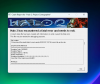
The game starts just fine and runs smoothly, but after a couple of minutes playing the image freezes, and then it gives me the "Halo 2 has encountered a fatal error and needs to exit" i need to run the task manager and end the game process to close it. The second image shows how the games looks when it crashes.

im running it on W11, with an I5 13420h and 16gb of ram. Sorry if bad grammar, english is not my mother language.
 

Attachments

Berthalamew

Lead Dev
Project Cartographer Staff
Jun 28, 2017
32
10
8
Gamertag
Berthalamew
#2
You'll need to install visual studio and run the editbin program on the halo2.exe file using the command below. (ignoring <> and everything inside of it)
On intel devices you'll need to modify the exe so it's large address aware due to an issue with d3d9on12.

Code:
editbin /LARGEADDRESSAWARE <PathtoExeHere>
 
Oct 27, 2025
8
1
3
25
Gamertag
Danjuz
#3
You'll need to install visual studio and run the editbin program on the halo2.exe file using the command below. (ignoring <> and everything inside of it)
On intel devices you'll need to modify the exe so it's large address aware due to an issue with d3d9on12.

Code:
editbin /LARGEADDRESSAWARE <PathtoExeHere>
what version of VS? the most recent?
 

Berthalamew

Lead Dev
Project Cartographer Staff
Jun 28, 2017
32
10
8
Gamertag
Berthalamew
#13
Check to see if it's generating a new crash dump in your Documents folder with the modified executable. It might be a different issue since a crash window didn't open now.