divine1gore

Staff
Project Cartographer Staff
Jan 12, 2019
163
35
28
Washington State, USA
Gamertag
divine1gore
#42
I'm going to post some server trouble shooting steps here


If you are receiving the server reconnecting message
==========================================
try
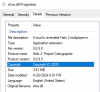
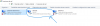
updating your xlive.dll to the latest version (you can check the details of your file to see what version it is compared to the latest release dll)
(right click the file, properties - > details) -- compare this with your game xlive.dll -
1715000737082.png
File is here:
https://cartographer.online/latest2/xlive.dll
Sometimes the manual update zip is out of date, and I recommend updating your dedicated server xlive.dll using this link
This will require it to be closed to overwrite the file, Another option is to just copy the file from your halo2 folder

reopen the server again afterwords to see if the issue is fixed


Dedicated Server Signing out error troubleshooting
======================
Start with checking / updating xlive dll as in the reconnecting message section above
There might be an issue with the server account login in the config file. Make sure that it has a simple password.
I forget the exact limit for server but it seems to be lower than in game. Make it simple like 8 characters.
Verify the account with the email. Make sure the account is playable from in game, make sure that the account isn't signed into still--exit the game then try launching the server with the account in the server config. The server config can exist in appdata or in the server folder or anywhere with the regedit trick for the service. Or it might even be reading the wrong config file--or changes weren't saved. You want to make changes to the config while the server is closed otherwise it overwrites the file with what it had cached in ram while running (a work around is to wait to save the file in your text editor until you close the server) I recommend putting the config in the server folder and set portable to true.
Or their is an issue with the firewall or port forward.
Or the pc lacks unique identifiers. Try following the guide below to fix it
https://www.halo2.online/threads/fi...get-win-uuid-failed-get-m-b-info-failed.2444/

There is another way around it with a dev account but we won't explore that unless it's needed If you try the above with no success. Go into the config And enable log console and set it to log level 1.
This will give you information about what is happening underneath the hood when you start the server, sign in and run the status command etc.
Then run it, take a video of the output and post it and I'll look it over.
After fixing the issue be sure to disable log console in the config file since it will just bog the process down

Feel free to direct message me on discord with any issues related to servers and I'll either assist myself or delegate accordingly
message / friend request / message request:

divine1gore

 
Last edited:
Dec 16, 2024
3
1
3
25
Gamertag
Esemes16
#44
I was not able to get the Direct X web setup to run since I am running mine on a Windows Server VM, but after some digging I found a Reddit post for someone having the same issue running a different game server, so I thought I'd share the fix. The fix is to download the files from Microsoft manually without the web installer from the link below.

Edit (fixed link):
https://www.microsoft.com/en-us/download/details.aspx?id=8109

https://www.reddit.com/r/sysadmin/comments/radiii
(Mods please delete if not allowed to share external links)
 
Last edited:
Nov 2, 2023
10
2
3
27
Colombia
Gamertag
Forerrunner
#45
This guide doesn't work at all. it's a waste of time. It always shows me this message.

h2server.exe: The term 'h2server.exe' is not recognized as the name of a cmdlet, function, script file, or executable program. Check that you typed the name correctly, or if you included a path, verify that the path is correct and try again.
On Line: 1 Char: 1
+ h2server.exe -createservice -live -instance:1
+ ~~~~~~~~~~~~
+ CategoryInfo: ObjectNotFound: (h2server.exe:String) [], CommandNotFoundException
+ FullyQualifiedErrorId: CommandNotFoundException
 
Likes: | SCRAPY |
Feb 14, 2013
190
73
28
www.youtube.com
Gamertag
UncutFighter
#47
This guide doesn't work at all. it's a waste of time. It always shows me this message.

h2server.exe: The term 'h2server.exe' is not recognized as the name of a cmdlet, function, script file, or executable program. Check that you typed the name correctly, or if you included a path, verify that the path is correct and try again.
On Line: 1 Char: 1
+ h2server.exe -createservice -live -instance:1
+ ~~~~~~~~~~~~
+ CategoryInfo: ObjectNotFound: (h2server.exe:String) [], CommandNotFoundException
+ FullyQualifiedErrorId: CommandNotFoundException
This is due to you not changing the directory to the location of the files.

Do one of the following:

Hold shift and right click within the folder where the server files are located and select open Powershell or open CMD in the menu, then enter the command to install the server instance.

You can also just open the Start menu in windows and search for CMD or Powershell. Right click and run it as administrator, then type the following: cd "C:\Halo 2 Dedicated Server" (you can change the directory location after cd to wherever you extracted the Halo 2 Dedicated Server folder to) and press enter, then enter the command to install the server instance.
 
Likes: Esemes16
Nov 2, 2023
10
2
3
27
Colombia
Gamertag
Forerrunner
#48
Esto se debe a que no cambia el directorio a la ubicación de los archivos.

Realice una de las siguientes acciones:

Mantenga presionada la tecla Mayús y haga clic con el botón derecho dentro de la carpeta donde se encuentran los archivos del servidor y seleccione abrir Powershell o abrir CMD en el menú, luego ingrese el comando para instalar la instancia del servidor.

También puede abrir el menú Inicio en Windows y buscar CMD o Powershell. Haga clic con el botón derecho y ejecútelo como administrador, luego escriba lo siguiente: cd "C:\Halo 2 Dedicated Server" (puede cambiar la ubicación del directorio después de cd a donde extrajo la carpeta del servidor dedicado Halo 2) y presione enter, luego ingrese el comando para instalar la instancia del servidor. [/CITA]


RESPUESTA:
Después de mucho tiempo finalmente pude "crear" el servidor y "supuestamente" me dice que está "funcionando" pero cuando entro al juego no tengo absolutamente nada, mi servidor no existe en la lista de servidores de Halo 2 ni en la lista de servidores en la página de halo2pc.com.

Tengo varios problemas para poder hacer visible este servidor, voy a enumerar cada fallo:

1: Seguí cada uno de los pasos exactamente como en la guía y logré llegar al final de la guía hasta que logré "ejecutar" el servidor con la instancia 1 con la variante de "zombies" pero el servidor no aparece en la lista del juego ni en la lista de servidores halo2pc, al ejecutar en CMD "h2server.exe -live" y poner "status" dice que el servidor está funcionando pero no existe en el juego.


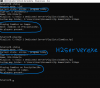
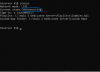
2: El siguiente problema es al ejecutar el comando "h2admin.exe" con la ruta de mi servidor cuando pongo "status" me dice "reconectando" En las siguientes imágenes muestro como tengo la configuración de "h2serverconfig1.ini" y "Halo2Config1"

No sé qué más hacer para que el servidor sea visible en la lista de servidores.

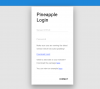
3: y por último, ¿cómo se puede gestionar el servidor desde la página "Pineapple"? ¿Cómo puedo saber la IP o puerto del servidor y la contraseña del servidor que he creado?
 

Attachments

Last edited:
Nov 2, 2023
10
2
3
27
Colombia
Gamertag
Forerrunner
#49
RESPUESTA:
Después de mucho tiempo finalmente pude "crear" el servidor y "supuestamente" me dice que está "funcionando" pero cuando entro al juego no tengo absolutamente nada, mi servidor no existe en la lista de servidores de Halo 2 ni en la lista de servidores en la página de halo2pc.com.

Tengo varios problemas para poder hacer visible este servidor, voy a enumerar cada fallo:

1: Seguí cada uno de los pasos exactamente como en la guía y logré llegar al final de la guía hasta que logré "ejecutar" el servidor con la instancia 1 con la variante de "zombies" pero el servidor no aparece en la lista del juego ni en la lista de servidores halo2pc, al ejecutar en CMD "h2server.exe -live" y poner "status" dice que el servidor está funcionando pero no existe en el juego.


2: El siguiente problema es al ejecutar el comando "h2admin.exe" con la ruta de mi servidor cuando pongo "status" me dice "reconectando" En las siguientes imágenes muestro como tengo la configuración de "h2serverconfig1.ini" y "Halo2Config1"

No sé qué más hacer para que el servidor sea visible en la lista de servidores.

3: y por último, ¿cómo se puede gestionar el servidor desde la página "Pineapple"? ¿Cómo puedo saber la IP o puerto del servidor y la contraseña del servidor que he creado? [/CITA]
 

Attachments

Last edited:
Nov 2, 2023
10
2
3
27
Colombia
Gamertag
Forerrunner
#50
After a long time I was finally able to "create" the server and "supposedly" it tells me that it is "working" but when I enter the game I have absolutely nothing, my server does not exist in the list of Halo 2 servers or in the list of servers on the halo2pc.com page.

I have several problems to be able to make this server visible, I will list each failure:

1: I followed each of the steps exactly as in the guide and managed to reach the end of the guide until I managed to "run" the server with instance 1 with the variant of "zombies" but the server does not appear in the game list or in the list of halo2pc servers, when running in CMD "h2server.exe -live" and put "status" it says that the server is running but does not exist in the game.


2: The next problem is when running the command "h2admin.exe" with my server path when I put "status" it tells me "reconnecting" In the following images I show how I have the "h2serverconfig1.ini" and "Halo2Config1" settings

I don't know what else to do to make the server visible in the list of servers.

3: and finally, how can the server be managed from the "Pineapple" page? How do I know the IP or port of the server and the password of the server I have created?

A DOUBT: a doubt I have is that my connection is not Lan it is by wifi, but another problem is that I connect to the internet via USB wifi with my phone "Remote NDIS based internet sharing device" is the name of my router, so I don't know if that has something to do with my server not being visible.
 

Attachments

Nov 2, 2023
10
2
3
27
Colombia
Gamertag
Forerrunner
#51
I'm going to post some server trouble shooting steps here


If you are receiving the server reconnecting message
==========================================
try
updating your xlive.dll to the latest version (you can check the details of your file to see what version it is compared to the latest release dll)
(right click the file, properties - > details) -- compare this with your game xlive.dll -
View attachment 1087
File is here:
https://cartographer.online/latest2/xlive.dll
Sometimes the manual update zip is out of date, and I recommend updating your dedicated server xlive.dll using this link
This will require it to be closed to overwrite the file, Another option is to just copy the file from your halo2 folder

reopen the server again afterwords to see if the issue is fixed


Dedicated Server Signing out error troubleshooting
======================
Start with checking / updating xlive dll as in the reconnecting message section above
There might be an issue with the server account login in the config file. Make sure that it has a simple password.
I forget the exact limit for server but it seems to be lower than in game. Make it simple like 8 characters.
Verify the account with the email. Make sure the account is playable from in game, make sure that the account isn't signed into still--exit the game then try launching the server with the account in the server config. The server config can exist in appdata or in the server folder or anywhere with the regedit trick for the service. Or it might even be reading the wrong config file--or changes weren't saved. You want to make changes to the config while the server is closed otherwise it overwrites the file with what it had cached in ram while running (a work around is to wait to save the file in your text editor until you close the server) I recommend putting the config in the server folder and set portable to true.
Or their is an issue with the firewall or port forward.
Or the pc lacks unique identifiers. Try following the guide below to fix it
https://www.halo2.online/threads/fi...get-win-uuid-failed-get-m-b-info-failed.2444/

There is another way around it with a dev account but we won't explore that unless it's needed If you try the above with no success. Go into the config And enable log console and set it to log level 1.
This will give you information about what is happening underneath the hood when you start the server, sign in and run the status command etc.
Then run it, take a video of the output and post it and I'll look it over.
After fixing the issue be sure to disable log console in the config file since it will just bog the process down

Feel free to direct message me on discord with any issues related to servers and I'll either assist myself or delegate accordingly
message / friend request / message request:

divine1gore


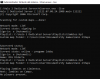
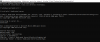
I have several problems being able to display my server in the list of game servers.

I have run h2server.exe -live and it tells me that "the server is running" but it is nowhere to be found.

Then I ran h2admin.exe and it tells me "reconnecting".

But when running the h2server.exe says it's "running" how do I fix this problem?

I attach two images...
 

Attachments